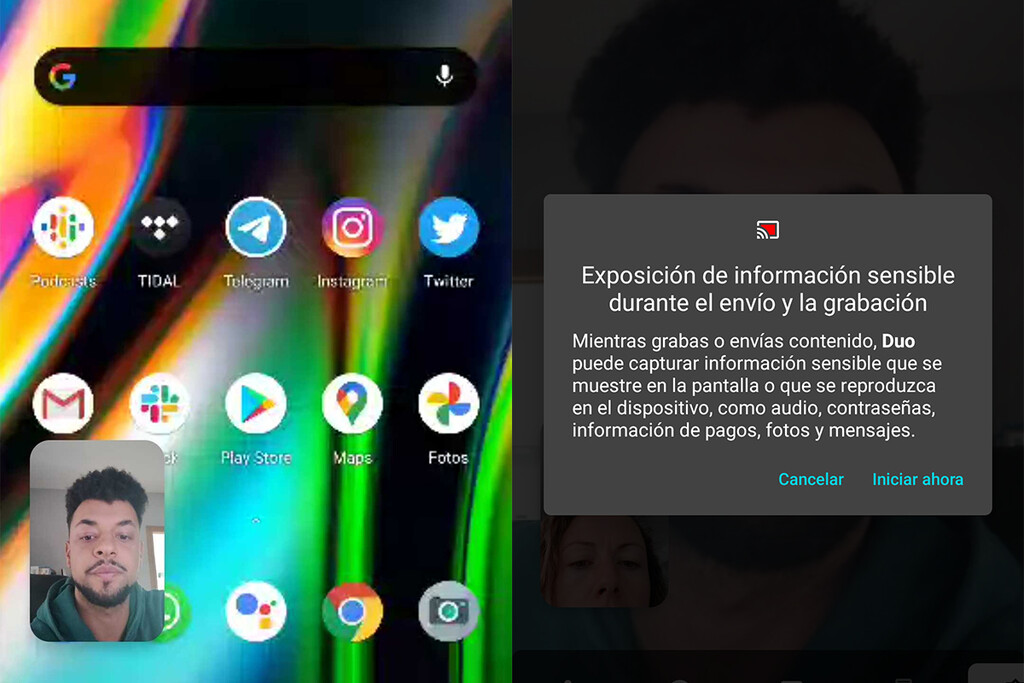
It was in the year 2018 when we first learned that Google Duo was preparing the option to be able to share your screen during a video call, although the function was never activated for all users. What’s more, a few months later, Google internally removed traces of said functionality.
Two years later, share screen return to Google Duo and, we hope that this time it will be definitive. As the name suggests, this option allows you to show what you see on the mobile screen during a call, instead of using the camera.
Screen sharing comes to Google Duo
In applications to make video calls on the PC it is relatively common that the screen can also be shared, but on the mobile there are not many that allow it. The latest to jump on the bandwagon is Google Duo which, two years later, is finally starting to enable users to option to share screen.

The deployment of this function is being staggered, as usual, so the easiest way to know if you have it active or not is to go to the appropriate menu and see if it appears. To do this, you must start a video call and during its course, press the button ⋮.
The list of options that appear may vary from one mobile to another, with elements such as Family, Effects edit, Portrait, Poor light or Share screen. After choosing the latter, you are shown an information window indicating that the application will share the content of the screen, in which you must press Start now.
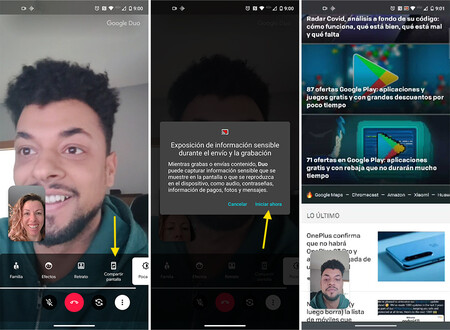
Once this is done, the screen is shared. That is, during the call, the other person will see what is seen on your mobile rather than what the camera captures of it, which can be useful to show something, indicate how a task is done or other similar situations.
If at any time you want stop screen sharingYou can do it from a permanent notification that shows you that the screen is being shared, giving you the option to end the call or stop sharing.

Google Duo: high-quality video calls
- Developer: Google LLC
- Download it at: Google play
- Price: Free
- Category: Communication
Via | Android Police
–
The news
Google Duo already allows screen sharing during a video call: this is how it works
was originally published in
Xataka Android
by
Ivan Ramirez
.